
5.3 TreeFlux
When TreeFlux is selected as the sampler mode, SmartConfig2 displays TreeFlux-specific settings and module controls. These settings define how SmartSampler2 reads sensors, flushes connected chambers and tubes, waits for equilibration, fills sample bags, and monitors the sampling sequence.
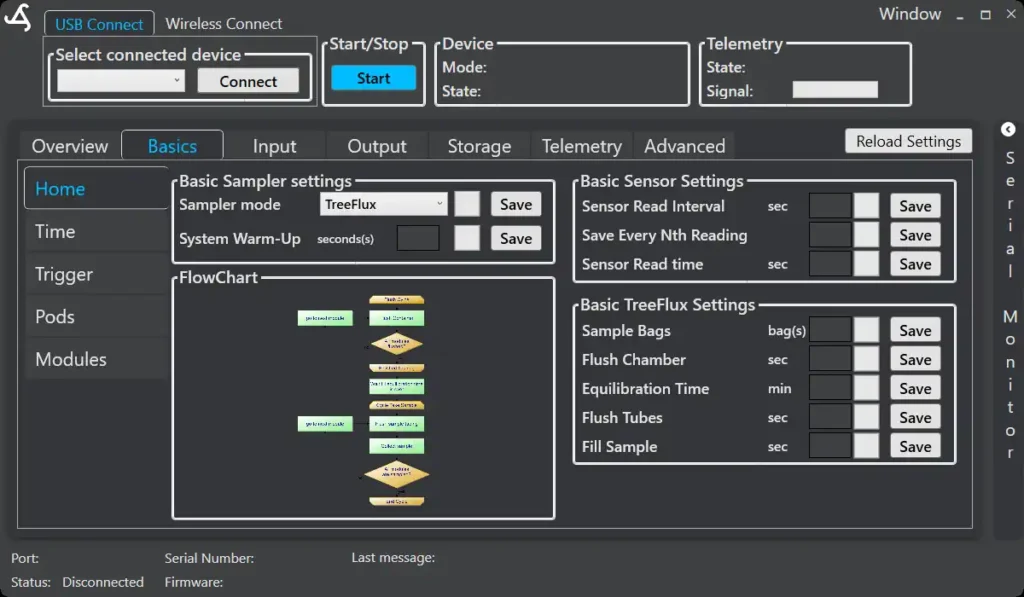
Configure TreeFlux
Connect to SmartSampler2 and select TreeFlux under Sampler mode. SmartConfig2 normally loads the device configuration automatically after connection. Use Reload Settings only when automatic retrieval did not complete or when you explicitly need to refresh the displayed settings.
The TreeFlux configuration and module controls are shown according to the selected sampler mode. The available configuration areas are organized as Overview, Basics, Input, Output, Storage, Telemetry, and Advanced.
Sensor settings
- Sensor Read Interval (sec): Sets how often configured sensors are read.
- Save Every Nth Reading: Sets how frequently readings are written to storage while sensor updates continue.
- Sensor Read Time (sec): Sets the duration of a sensor-read cycle, allowing connected sensors time to stabilize.
The save interval controls storage frequency. For example, if sensors are read every second and the save interval is 10, every tenth reading is saved. Averaged measurements and averaging workflows are not available controls in the current interface.
TreeFlux sampling settings
- Sample Bags (bag/s): Sets the number of sampling bags connected to the system.
- Flush Chamber (sec): Sets how long the chamber is flushed before equilibration.
- Equilibration Time (min): Sets how long SmartSampler2 waits for the chamber atmosphere to stabilize before sampling.
- Flush Tubes (sec): Sets how long the tubing is flushed before collection to reduce carry-over from an earlier sample.
- Fill Sample (sec): Sets how long the sample pump runs to fill the selected bag.
Triggers and startup
TreeFlux sampling can be started by the configured immediate, time-based, sensor-based, or combined trigger conditions. Configure the initial and repeating triggers under Basics > Trigger. A remote trigger can also start a configured operation when telemetry is connected.
If a startup warm-up is configured, it allows SmartSampler2 and its telemetry system to initialize before the operating program begins. Sensors are usually not switched on during this startup warm-up. The countdown completes before the actual TreeFlux sampling program starts.
How a TreeFlux sequence runs
A TreeFlux cycle takes pre-readings, powers and prepares the connected modules, opens the purge path, switches on the flush pumps, and flushes the chamber for the configured time. It then closes the purge path, performs post-flush readings, and waits for the configured equilibration period before collecting the sample.
During collection, SmartSampler2 opens the sample path, runs the sample pump for the configured sample time, closes the sample path, switches off the pump, records post-readings, and saves or transmits the resulting data before continuing to the next configured bag or module.
Multiple TreeFlux modules
Connected TreeFlux modules are processed in groups of up to three. SmartSampler2 completes the configured preparation and flush stages for one group, records module timing, and then advances to the next group. The configured equilibration period is applied before sampling the active group.
If no TreeFlux modules are connected, the TreeFlux workflow proceeds to its next supported sequence rather than collecting module samples. Check the module connection and configured module quantity before deployment.
Manual module controls
When the module interface is available, SmartConfig2 provides manual controls for selecting a module position and switching supported valves and pumps. The pump control includes an Inverted option where supported by the connected setup. Use manual controls only after confirming the connected tubing, chambers, bags, and collection area are safe for the selected action.
The module interface can also provide a single data request, live readings, and a readings table with raw and converted values where supported. Use these controls to verify module communication before starting an automated sequence.
Module status and troubleshooting
During a TreeFlux sequence, diagnostic messages identify stages such as opening flush valves, switching on flush pumps, flushing the chamber, waiting for equilibration, and completing a module group. Use these messages to confirm that the sequence is progressing as expected.
A module acknowledgement timeout means that a module did not confirm a command within the expected response period. TreeFlux processing can advance after this timeout, so inspect the affected module and recorded data before relying on the result. Check the module address, power supply, communication connection, and configured module quantity.
Flowchart
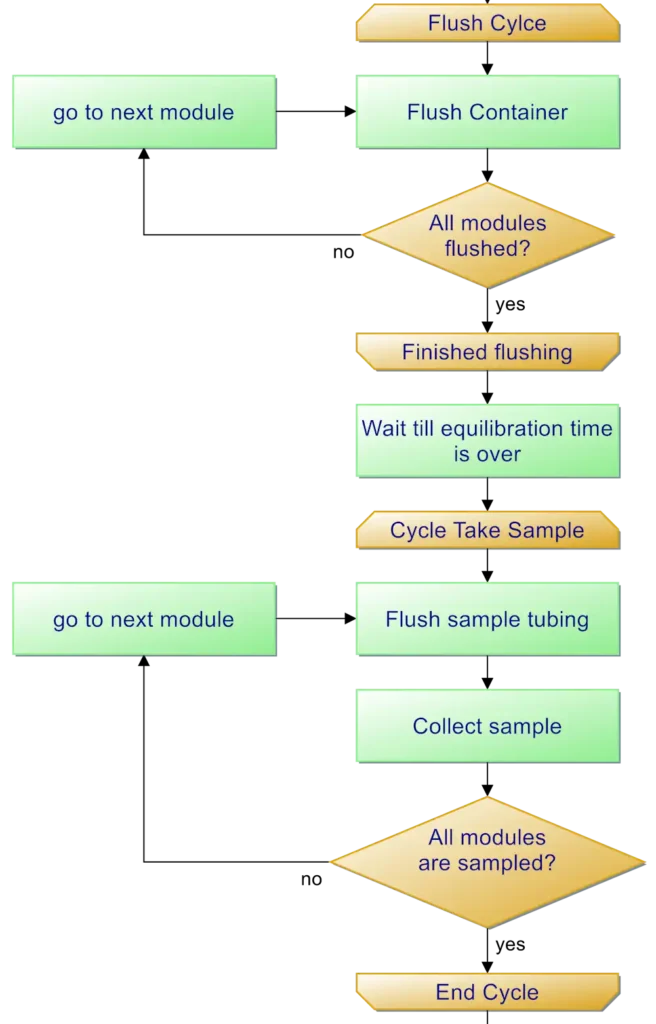
The flowchart visualizes the sequence from pre-readings, module preparation, chamber and tube flushing, and equilibration through bag filling, post-readings, data handling, and repeat processing.
For physical installation and operating requirements, consult the applicable verified SmartSampler2 hardware reference and the SmartSampler2 AutoSampler hardware documentation where that connected module configuration applies.