
6.1 AquaMate
Open Input > Modules > AquaMate to configure connected AquaMate modules and perform supported maintenance and diagnostic operations. Connect SmartConfig2 to SmartSampler2 first and allow the settings to load automatically.
Basics
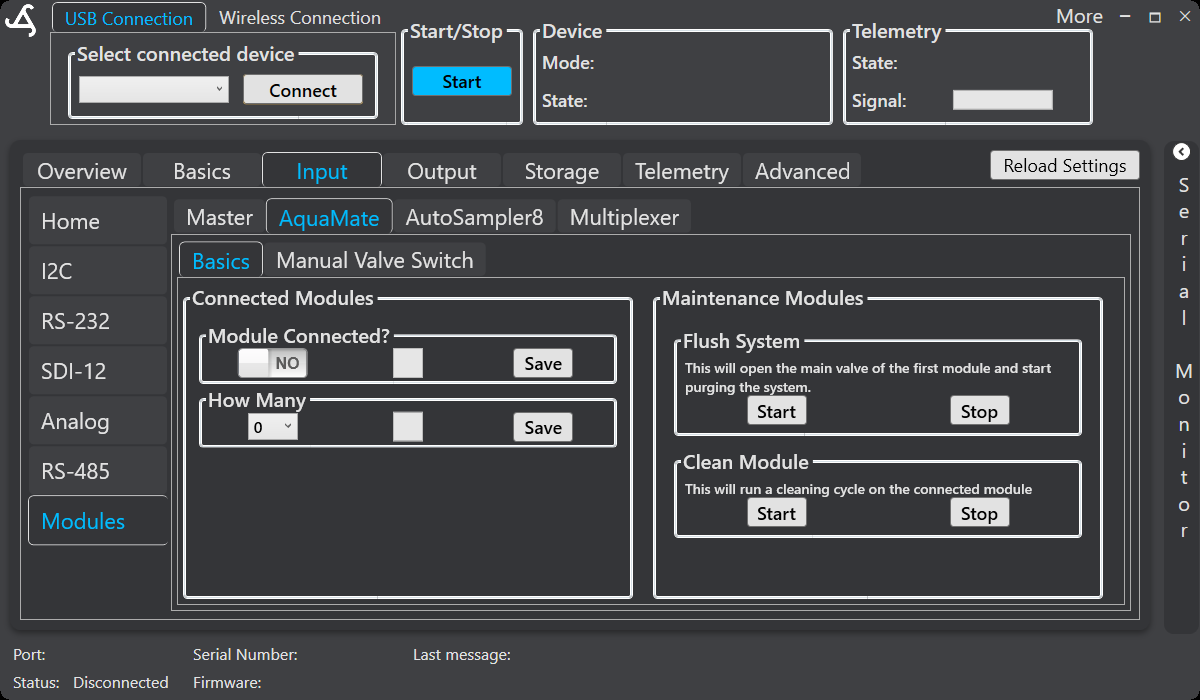
Use the Connected Modules section to set Module Connected? and select How Many. Save each setting after changing it. The screen also provides maintenance controls:
- Flush System > Start: Opens the main valve of the first module and starts purging the system.
- Flush System > Stop: Stops the flushing operation.
- Clean Module > Start: Starts a cleaning cycle on the connected module.
- Clean Module > Stop: Stops the cleaning operation.
Stop automated sampling before starting maintenance. Confirm that the inlet, outlet, waste line, and collection equipment are connected safely before opening valves or starting a pump.
Sampling and flow-controlled filling
Configure the sampling sequence in the AquaMate sampler mode. SmartSampler2 can use configured time, sensor, or remote triggers, then perform the supported purge, valve, filling, pressure-release, and next-sample steps.
With a supported flow-control setup, SmartSampler2 monitors flow while filling, accumulates delivered volume, and stops when the configured trigger volume is reached. The workflow also uses the configured maximum fill time, pump delay, purge time, and sample-position settings. Flow rate and accumulated volume can be included in recorded or transmitted data where configured.
Manual Valve Switch
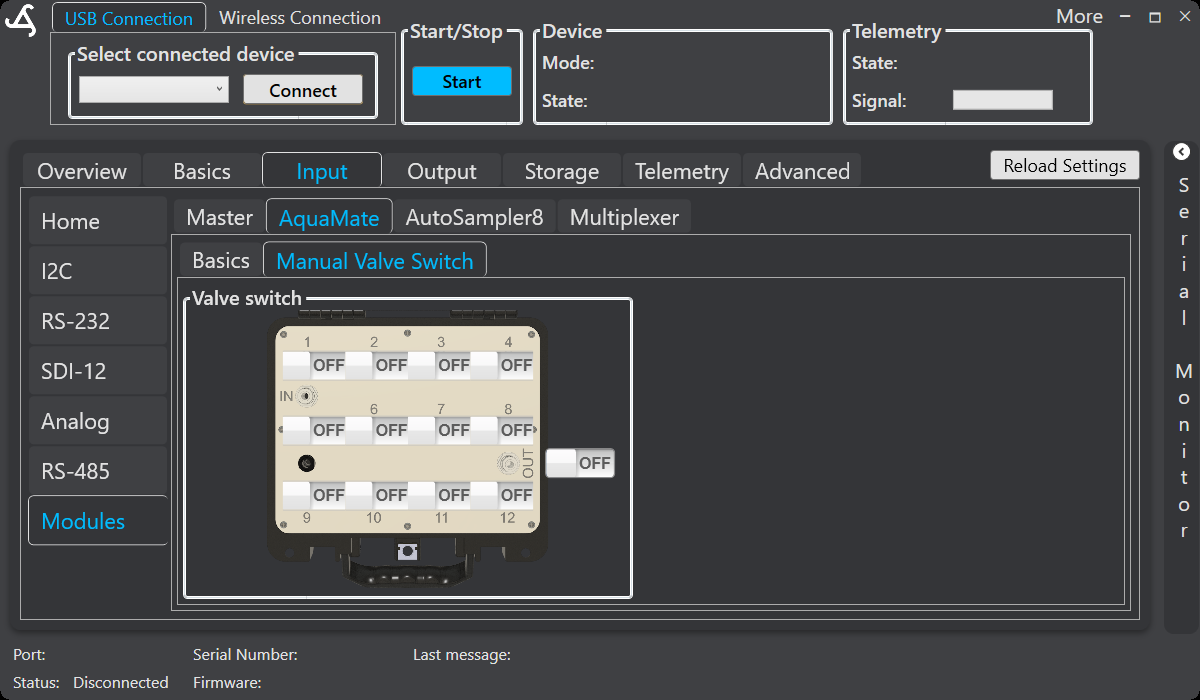
The Manual Valve Switch screen provides a graphical layout with individual ON/OFF controls for valve positions 1 through 12 and an overall switch control. Use this screen for supported setup, maintenance, and troubleshooting—not as part of the normal automated sampling sequence.
Before operating a valve, verify the selected module, tubing connections, sample containers, and waste path. Stop the program before using manual controls, and return the valves to the required operating state before resuming automatic sampling.
Using AquaMate in a user-defined program
A user-defined program can include a supported AquaMate command with the required module address, position or output, state, and optional program-section assignment. This allows AquaMate actions to be combined with delays, sensor readings, output switching, telemetry, formulas, comparisons, counters, and flow-controlled filling. Use manual controls for setup and diagnosis; use a program command for a repeatable automated workflow.
Hardware documentation
For AquaMate capacity, installation, filtering, tubing, sample protection, and safe operation, see the verified SmartSampler2 AquaMate hardware documentation.