
1. Overview
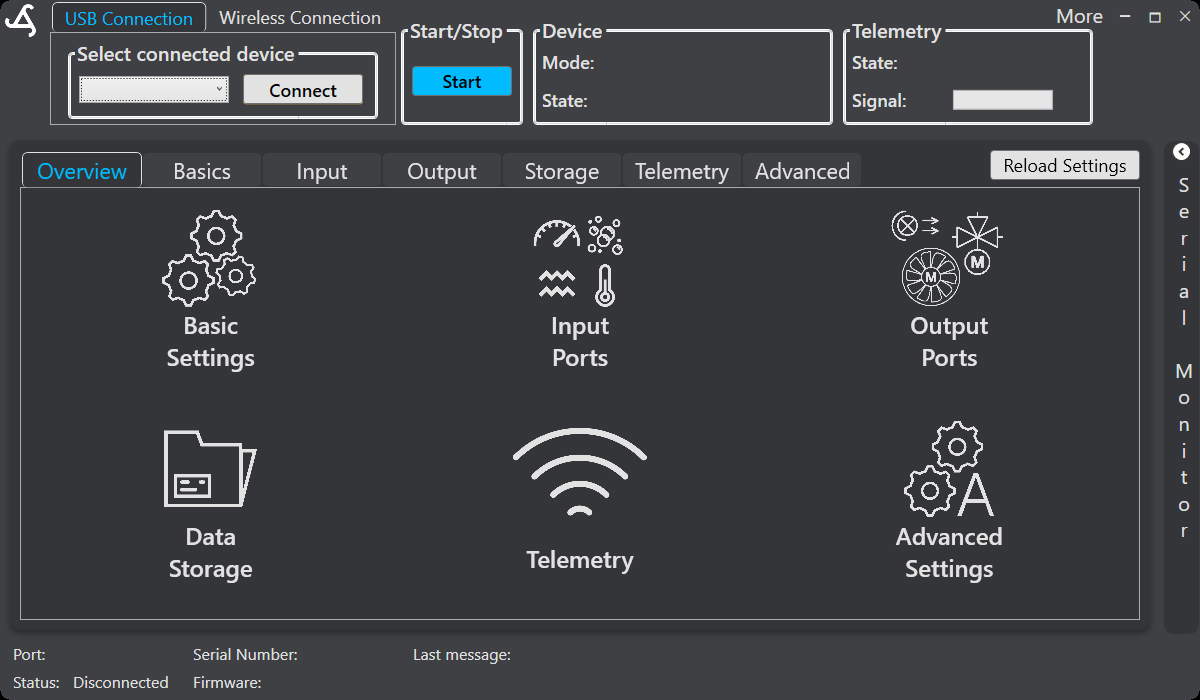
SmartConfig2 is the dedicated configuration and monitoring software for the SmartSampler2 platform. The application’s main screen provides connection controls, sampler controls, device and telemetry status, configuration navigation, and a status bar.
Connection methods
The top of the window provides USB Connection and Wireless Connection options. For a local connection, open the device selector, choose a detected SmartSampler2 device, and select Connect. SmartConfig2 updates the available-device list when devices are connected or disconnected.
For a wireless connection, select Wireless Connection and provide the required device system serial number and account credentials. You may choose the connection alias freely. Do not share credentials or device identifiers unnecessarily.
Automatic settings retrieval
After a successful connection, SmartConfig2 normally requests the SmartSampler2 settings automatically and updates the configuration interface with the values returned by the device. Use Reload Settings only when automatic retrieval did not complete or when you explicitly need to refresh the displayed configuration.
Main configuration navigation
The main navigation follows the application’s visible order:
- Overview provides large navigation buttons for the other configuration areas.
- Basics contains general sampling and timing settings.
- Input contains sensor and communication-interface settings.
- Output contains supported output controls.
- Storage provides supported data and settings-file controls.
- Telemetry contains cellular telemetry configuration and monitoring.
- Advanced contains advanced system settings, diagnostics-related controls, and reset functions.
Operation and status
The Start/Stop area provides controls to start, remotely trigger an update, and stop SmartSampler2 operation. The device state can report values such as Ready, Running, Running: Warming up, and Stopped. The status bar shows connection information such as the active port, device information, firmware information, the last message, and connection status.
Telemetry status is shown separately from the status bar. When supported by the installed cellular telemetry module and a valid GPS fix, SmartSampler2 can provide position, altitude, GPS-derived time, and fix status for display in SmartConfig2.
Configuration scope
SmartConfig2 can configure supported analog, I²C, SDI-12, RS-232, RS-485, and UART inputs; sampling timing and warm-up; outputs; local storage; telemetry; advanced settings; and supported sampler modes. The available controls depend on the connected hardware and configuration.
For connector, cable, signal, and communication-interface information, see the SmartSampler2 Hardware Interfaces documentation.
Related hardware: SmartSampler2 hardware reference.