
SmartConfig2
Configure sensors, outputs, sampling programs, telemetry, firmware, and diagnostics.
SmartConfig2 is the desktop application for configuring, operating, monitoring, and maintaining SmartSampler2. Connect locally through USB or remotely through an installed LTE telemetry module and MQTT service, then use the application to load device settings, configure interfaces, manage storage, configure telemetry, monitor status, and control sampler operation.
Start here
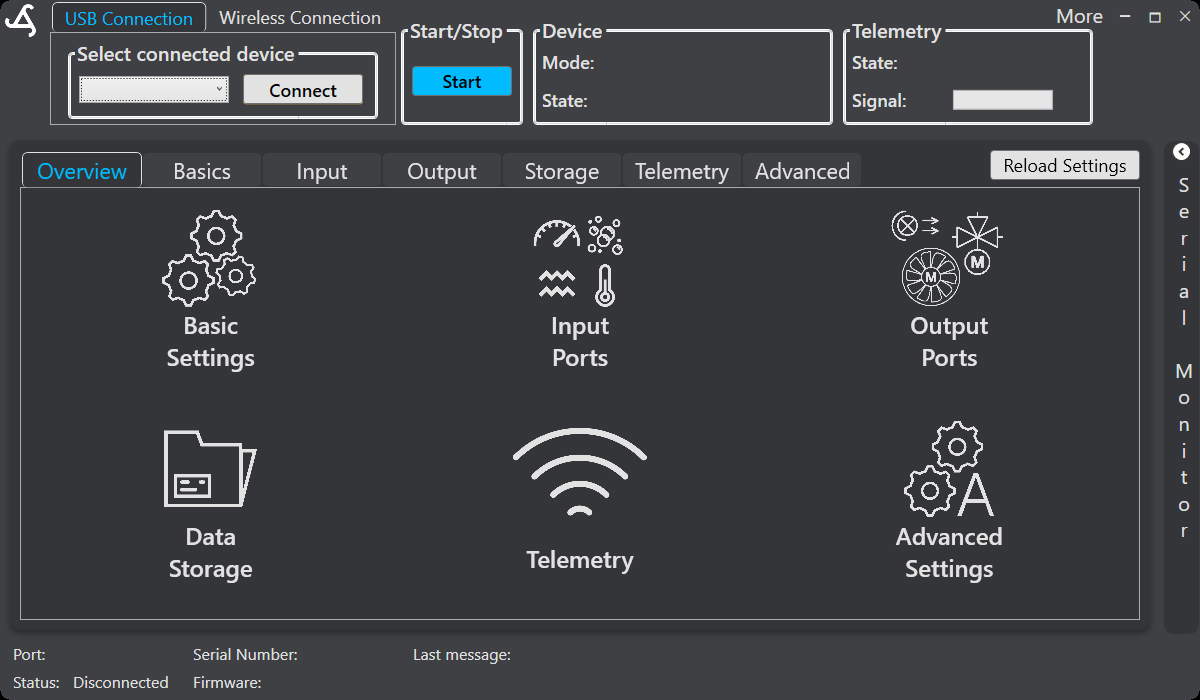
- 1. Overview describes the main screen, connection controls, configuration navigation, status information, and the normal settings-retrieval workflow.
- 2. Getting Started covers installation, USB connection, wireless connection requirements, and first setup.
Typical workflow
- Connect SmartSampler2 using USB, or select Wireless Connection when using the installed LTE telemetry module.
- Select the detected device and choose Connect. SmartConfig2 normally retrieves the device configuration automatically after connection.
- Use the configuration areas in this order as needed: Overview, Basic, Input, Output, Storage, Telemetry, and Advanced.
- Save changes to SmartSampler2, then use Reload Settings only if automatic retrieval did not complete or a deliberate refresh is required.
- Use the start, remote-trigger, and stop controls only when the device is correctly configured and connected.
Supported configuration and monitoring
Depending on the installed hardware, enabled configuration, and available licensing, SmartConfig2 can configure analog, I²C, SDI-12, RS-232, RS-485, and UART interfaces. Serial tools support interface configuration, variable parsing, live readings, manual requests where supported, and pass-through operation for supported serial interfaces. SmartSampler2 can use time-based, sensor-based, or combined trigger workflows, followed by any configured warm-up and sampling sequence.
SmartConfig2 also provides controls for local data and diagnostic storage, telemetry settings, advanced system settings, settings import and export, sampler status, and supported firmware maintenance. Available controls depend on the connected SmartSampler2 configuration.
Hardware reference
Before wiring or selecting an interface, consult the SmartSampler2 Hardware Interfaces documentation. It covers the USB connection, configurable ports, communication interfaces, signal considerations, and hardware indicators. For the physical USB connection, use the originally supplied cable when a watertight connection is required; standard Mini USB-B cables can provide data communication but do not provide the same watertight seal.
Related hardware: SmartSampler2 hardware reference.