
4.5.1 General
The General section provides an overview of the current telemetry status and basic connectivity checks.
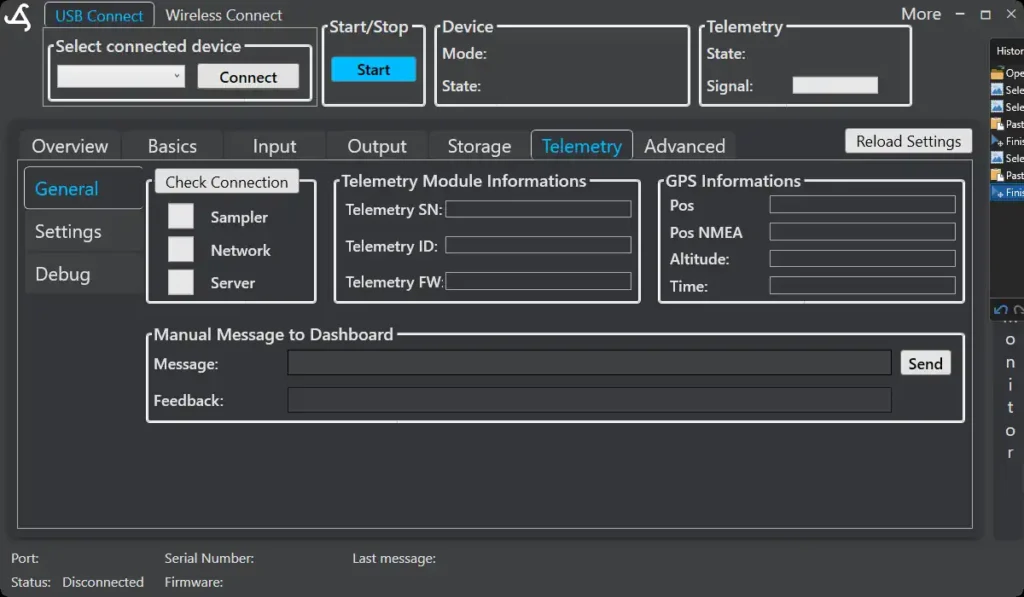
Connection Status
Shows whether the SmartSampler2 is connected to:
- Sampler (internal system)
- Network (cellular network)
- Server (remote data platform)
This helps quickly identify where a connection issue may occur. SmartSampler2 also checks these connections during operation and can attempt to reconnect or restart the cellular connection if communication is lost.
When the connection status is checked, SmartConfig2 first clears the sampler, network, and server indicators and then requests the current status directly from the connected SmartSampler2. The indicators may therefore appear disconnected or empty briefly while the device responds. Wait for the status update before diagnosing a connection issue.
Telemetry Module Information
Displays identification details of the installed telemetry module:
- Telemetry serial number
- Telemetry ID
- Telemetry firmware version
This information is useful for support and system verification. SmartConfig2 can also update displayed sampler identification and firmware information when those values are supplied through remote telemetry.
GPS Information (if enabled)
Shows available GPS data provided by the telemetry module:
- Position
- NMEA position string
- Altitude
- Time
- GPS fix status
GPS data availability depends on configuration, signal conditions, and whether the module has a valid GPS fix. Position may be shown in formatted degrees, minutes, and seconds as well as in the received coordinate form.
Remote monitoring and live updates
When connected to a telemetry service, SmartConfig2 can receive remote telemetry and update displayed sampler information. Depending on the data supplied, this can include measured values, diagnostic supply measurements, GPS information, and device identification.
Live updates can be enabled or disabled from the telemetry controls. The interface reports the live-update state, including when SmartSampler2 disables live updates.
Manual Message to Dashboard
Allows sending a manual test message to the connected dashboard.
This can be used to verify end-to-end communication.
If the server is unavailable, queued telemetry and locally stored history remain available for later handling. Review Data Storage before treating a missing remote record as lost data.
For a physical USB connection between SmartConfig2 and SmartSampler2, see Hardware Interfaces. Use the originally supplied cable when the waterproof connection is required.
Related hardware: SmartSampler2 hardware reference.