
4.3.2 Power
The Power tab assigns a supply level to each SmartSampler2 output. The settings determine how the supply connected to Power In is applied when an output is switched on manually or by a sampling program.
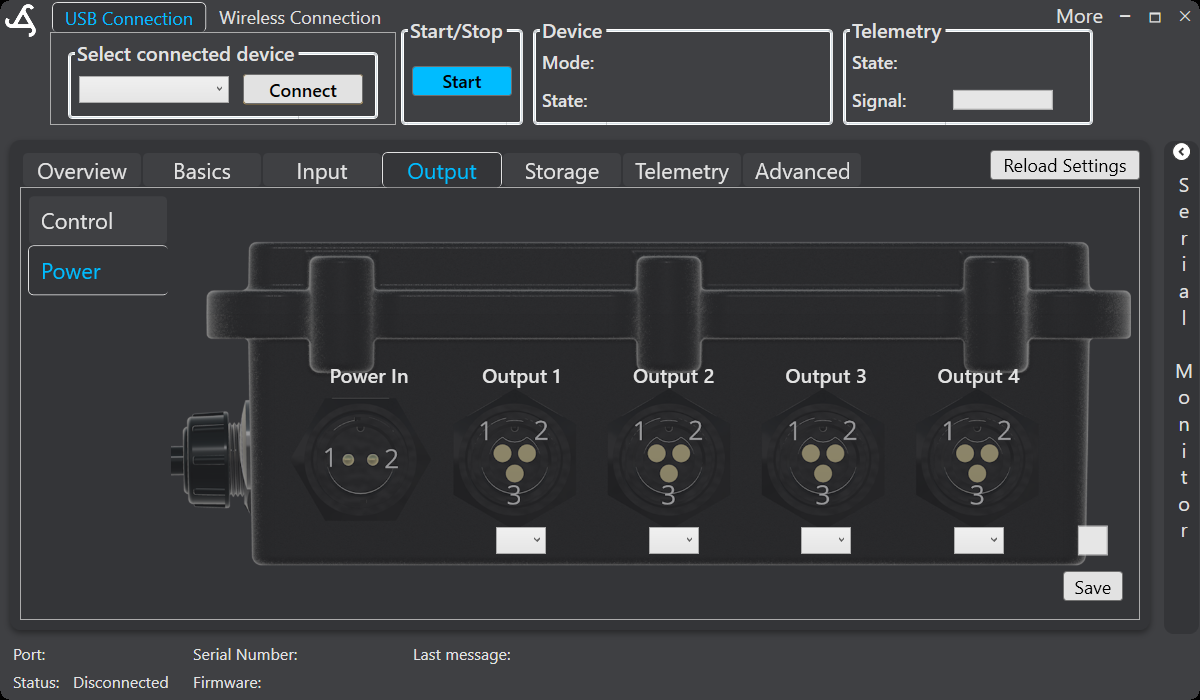
Power controls
The screen identifies Power In and provides a separate selection field for Output 1, Output 2, Output 3, and Output 4. Select the required level for each output independently. SmartConfig2 provides output strength values from 0 through 10, where the selected value controls the configured output strength; the exact suitability still depends on the connected hardware and load.
Set output power
- Connect to the intended SmartSampler2.
- Allow SmartConfig2 to retrieve the device settings automatically. Select Reload Settings only when the retrieval did not complete or an explicit refresh is needed.
- Open Output, then select Power.
- Choose the required level for each output.
- Review every value against the connected device, wiring, and approved hardware requirements.
- Select Save to send and store the configuration.
A level of 0 disables power delivery through that configured output. A saved setting applies when the output is subsequently switched on manually or by a sampling program. Changing a selection before saving leaves the displayed setting unsaved.
Important precautions
- Do not treat the software level as a replacement for checking the connected load, fuse, wiring, and hardware limits.
- Do not change wiring while the SmartSampler2 or connected equipment is powered.
- Before testing, confirm the output function in 4.3.3 Configuration.
- Use 4.3.1 Control to switch an output briefly after saving, if a controlled test is required.
SmartSampler2 switches configured power outputs off during startup. When supported power-down behavior is enabled, outputs and polarity-control signals are also switched off during device power-down.
For verified Power In requirements, output ratings, connector information, and safety instructions, consult the SmartSampler2 hardware interfaces documentation.
Related hardware: SmartSampler2 hardware reference.