
5.1.9 Conditional execution and sub-programs
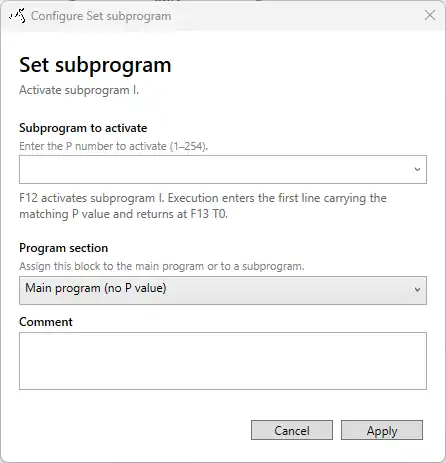
A SmartConfig2 user-defined program can contain a main program and numbered subprograms. The main program uses no program-section value. Assign an action to a numbered subprogram by double-clicking the block and selecting Program section, or select one or more blocks and use the context menu to assign them to the main program or a subprogram.
Subprogram assignment controls which instructions participate while that subprogram is active. Code flow still determines the physical order of instructions in the generated SmartSampler2 program. Activating a subprogram does not create a separate visual program or automatically rearrange the flowchart.
Activating a subprogram
Use one of the following actions:
- Set subprogram: activates the selected subprogram unconditionally.
- Compare: evaluates the configured comparison and activates the selected subprogram when the comparison is true.
When the subprogram is activated, execution continues through the generated instruction order while instructions assigned to the active subprogram are executed. A jump can additionally move execution to a configured target.
Ending a subprogram
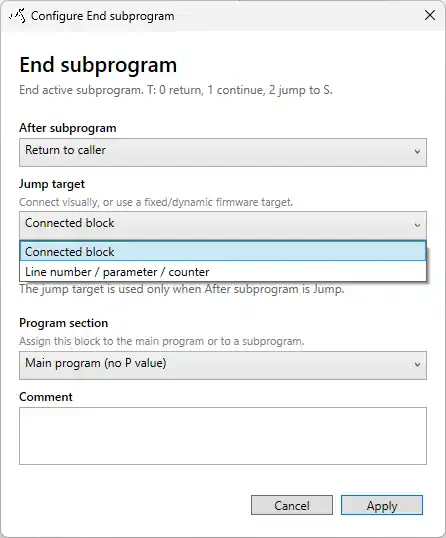
Use End subprogram to deactivate the active subprogram and select what happens next:
- Return to caller: resumes after the action that activated the subprogram.
- Continue: deactivates the subprogram and follows the subsequent normal code flow.
- Jump: deactivates the subprogram and continues at the configured target.
For a jump, choose either a connected block or a supported line-number, parameter, or counter target in the configuration window. The target is used only when the continuation option is Jump.
Planning and validating a subprogram
- Create the main-program and subprogram actions.
- Assign every subprogram action to the same program-section number.
- Activate the section with Set subprogram or a true Compare action.
- Add End subprogram to the section and choose Return, Continue, or Jump.
- Use Simulation to step through activation and the selected continuation path.
- Use the Validation tab before applying the program.
Validation reports configuration problems such as an activated subprogram with no assigned instructions. It can also identify subprograms that are never activated or do not contain an instruction that clearly exits them. Correct reported errors and validate again.
End program terminates the complete user-defined program. It does not merely end the active subprogram.
For the underlying device connection, module, and output requirements, consult the applicable SmartSampler2 Hardware Interfaces documentation before deployment.
Related hardware: SmartSampler2 hardware reference.