
3.2 Configuration Area
The Configuration Area is the central workspace where SmartConfig2 presents and edits SmartSampler2 settings. Its navigation follows the application order shown in the interface:
- Overview
- Basic
- Input
- Output
- Storage
- Telemetry
- Advanced
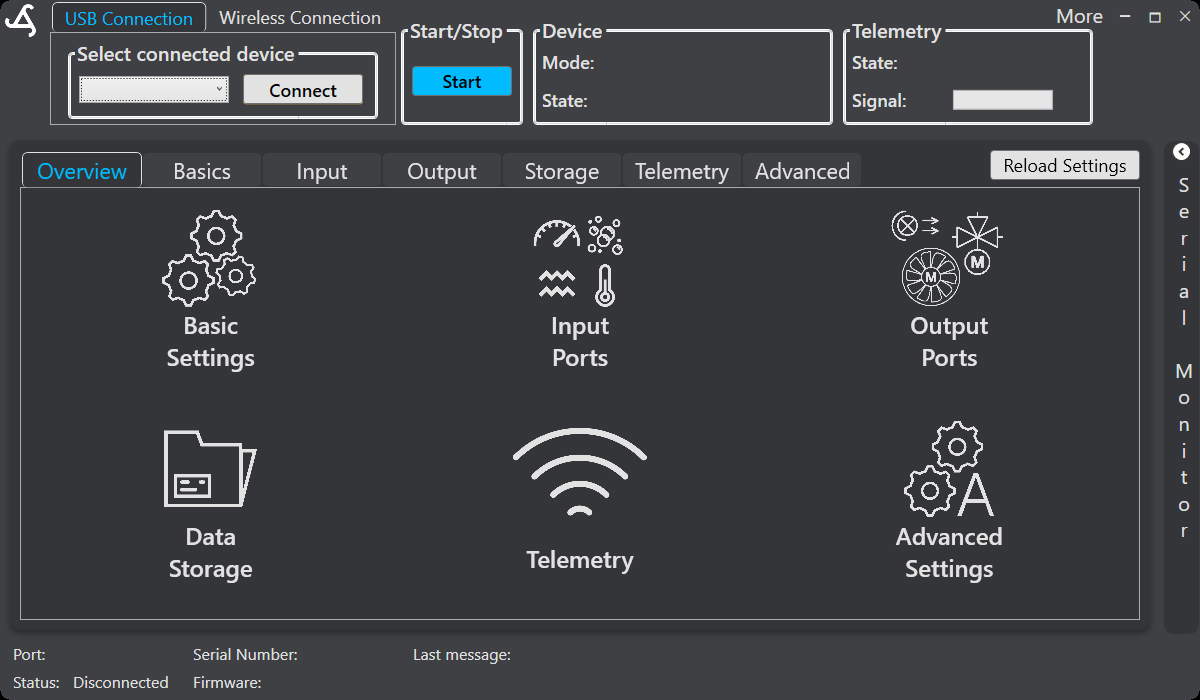
Overview provides large navigation buttons for Basic Settings, Input Ports, Output Ports, Data Storage, Telemetry, and Advanced Settings. You can also select these areas from the top navigation tabs. Within an area, sub-navigation provides access to more specific functions; for example, Input includes Home, I2C, RS-232, SDI-12, Analog, RS-485, and Modules.
Normal configuration workflow
- Connect to SmartSampler2 from the Top Bar.
- Allow SmartConfig2 to retrieve the device configuration automatically.
- Open the required area from Overview or the top navigation.
- Review the displayed values, make the required changes, and use the relevant save or write control.
- Use Reload Settings only when automatic retrieval did not complete or when you explicitly need a fresh copy of the device configuration.
Progress indicators provide visible feedback for settings writes and reload operations. A gray synchronization indicator means that a value has not yet synchronized with SmartSampler2; blue indicates that it is synchronized.
Available configuration areas
- Basic contains sampler mode, startup warm-up, sensor-read timing, save interval, and user-defined parameters where applicable.
- Input provides supported sensor and communication interfaces, including analog inputs, I2C, SDI-12, RS-232, RS-485, modules, and UART interfaces where supported by the installed hardware and configuration.
- Output provides supported output configuration and control.
- Storage provides access to stored program code, settings, and data-log operations.
- Telemetry provides supported wireless service configuration and connection status.
- Advanced provides system configuration, power-down behavior, low-voltage threshold settings where applicable, settings import/export/reset, and additional support or diagnostic controls.
For example, Input > Modules > Master provides controls for changing a module sub-address and requesting module information. Change a module address only when the module-address requirements are satisfied; the interface warns that address conflicts may occur if more than one module is connected.
Always match SmartConfig2 settings to the connected SmartSampler2 model, installed modules, and wiring. The hardware documentation describes configurable ports, communication interfaces, supply options, indicators, and connection precautions. See SmartSampler2 Hardware Interfaces.