
Many action settings can use either a fixed value entered directly or a value selected from the dropdown list. The available choices depend on the action and input field.
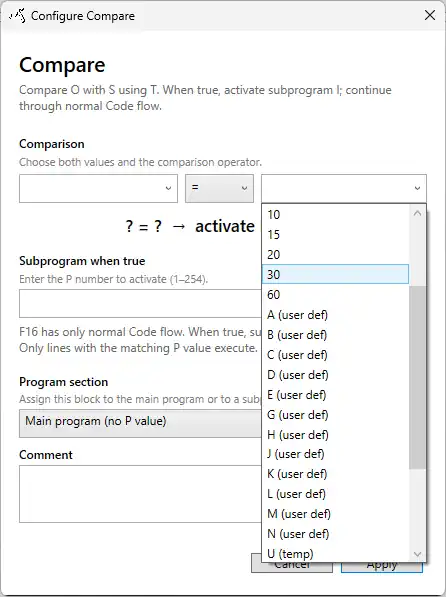
For example, the duration of a Delay can be entered directly or selected from an available parameter. In a Compare action, both comparison values can be entered or selected independently.
Sensor variables
The lowercase sensor variables are available only in formulas. They represent the current sensor values supplied to the formula.
| Variable | Description |
|---|---|
a | Sensor value 1 |
b | Sensor value 2 |
c | Sensor value 3 |
d | Sensor value 4 |
These variables are live input values and cannot be used directly as general program parameters outside formulas.
User parameters
User parameters can be edited by the user and used as inputs in program actions and formulas.
| Variables | Range | Editable | Usage |
|---|---|---|---|
A B C D E G H J K L M N | 0–65535 | Yes | Program parameters and formulas |
A user parameter is evaluated using its current value whenever the corresponding action is executed. Ensure that the required parameter has been configured before it is used by the program.
Temporary storage
Temporary storage variables hold intermediate values used during program execution.
| Variable | Description |
|---|---|
U | Temporary storage 1 |
V | Temporary storage 2 |
W | Temporary storage 3 |
X | Temporary storage 4 |
Y | Temporary storage 5 |
Z | Temporary storage 6 |
Temporary storage is intended for runtime logic and intermediate results. These variables are not pulse counters.
Formula result
| Variable | Description |
|---|---|
r or R | Result of the most recently executed formula |
Using r or R is the recommended method for transferring a calculated formula result into subsequent program logic.
The value of r or R is replaced whenever another formula is executed. If a result must be retained for later use, copy it into a suitable temporary storage variable before executing another formula.