
The Visual Programmer consists of several areas for creating, reviewing, and testing a user-defined program. Actions are selected from the left-hand panel and arranged on the central canvas. The tabs provide access to the generated code, simulation, and program validation.
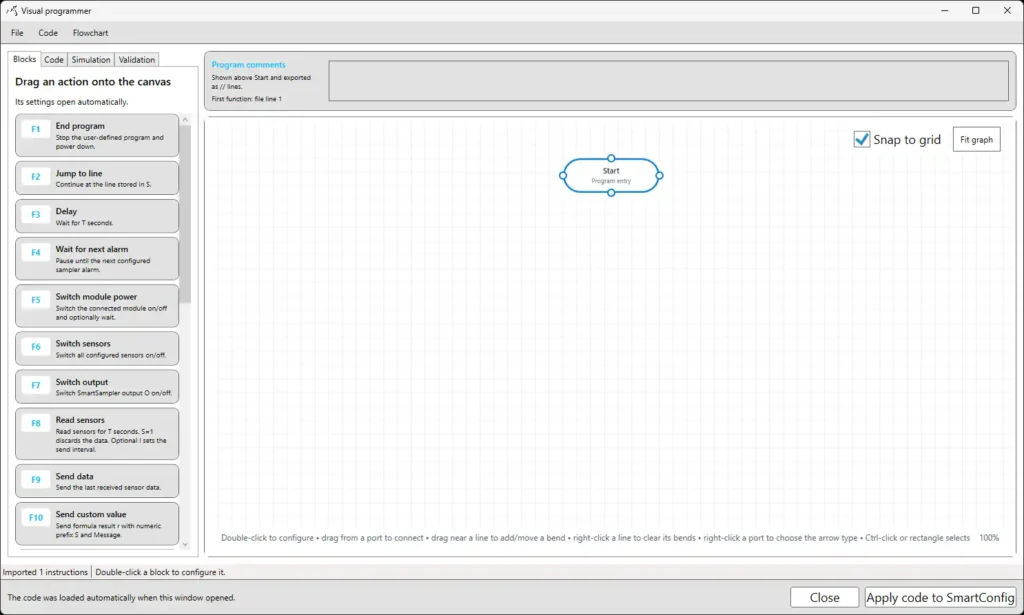
The main areas of the Visual Programmer are:
- Blocks: Contains the available actions that can be added to the program. Drag an action from the list onto the canvas to add it.
- Code: Displays the program code generated from the visual workflow.
- Simulation: Allows the program flow to be tested without running it on the SmartSampler2.
- Validation: Displays errors and warnings detected in the program.
- Program comments: Provides space for a general description of the program. The comment is included when the program is exported.
- Canvas: The main workspace in which actions are positioned and connected. Program execution begins at the Start block.
- Snap to grid: Aligns blocks to the canvas grid when they are moved.
- Fit graph: Resizes and repositions the view so that the complete program is visible.
- Status area: Displays information about imported instructions, selected actions, and the current operation.
- Apply code to SmartConfig: Generates the program code and returns it to SmartConfig2.1.
- Close: Closes the Visual Programmer without applying the current changes.