
The Validation tab checks the generated program code for recognised structural and configuration issues. Before running validation, select Code → Export flowchart to code to update the code from the current visual workflow.
If no recognised issues are detected, the following message is displayed:
Validation passed – no issues found
If an issue is detected, the Validation tab displays the number of issues and provides the following information:
- Line: The line associated with the issue.
- Level: The severity of the issue.
- Message: A description of the detected problem.
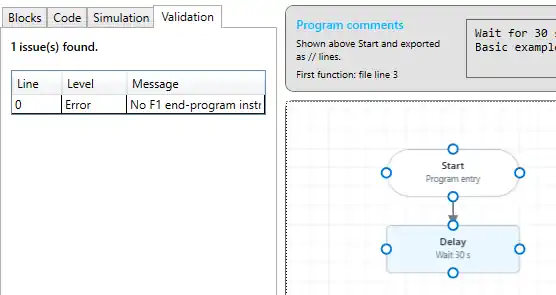
Correct the reported problem on the canvas, export the flowchart to code again, and return to the Validation tab to repeat the check.
If the message indicates that no F1 – End program instruction exists, add an End program action to the workflow and ensure it forms part of the intended program.
The validation function in the current SmartConfig2.1 version is still under development and does not detect every possible visual-programming issue. For example, a missing connection may not currently produce a validation error.
A successful validation therefore does not guarantee that the complete flowchart will execute as intended. After validation, use the Simulation tab to check the execution sequence, connections, jumps, comparisons, and sub-program behaviour.