
Analog
The Analog tab is used to view, calibrate, and verify analog input signals.
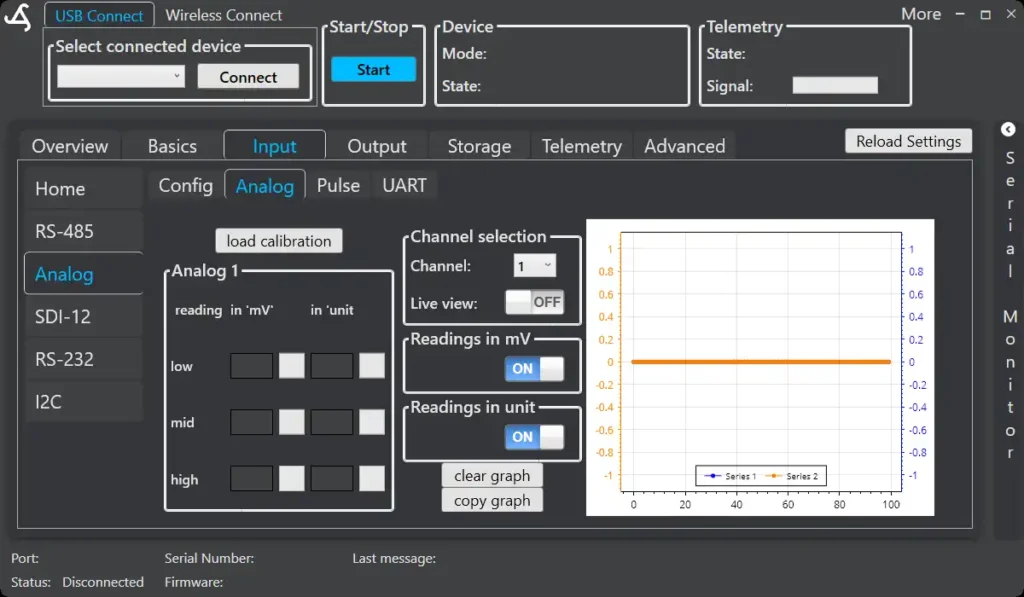
Channel Selection
Select the analog channel to configure or inspect using the Channel dropdown.
Only channels enabled as Analog input in the Config tab are available here.
Live View
Enable Live view to display real-time readings from the selected channel.
Two display modes are available:
- Readings in mV – raw voltage measurement
- Readings in unit – converted values based on calibration
Live view is intended for setup and verification and should be disabled during normal operation.
Calibration
Each analog channel supports a simple three-point calibration:
- Low
- Mid
- High
Calibration allows conversion from voltage values to meaningful units (e.g. temperature, level, pressure).
Use Load calibration to apply an existing calibration profile.
Graph View
The graph shows live signal changes over time.
Available actions:
- Clear graph – resets the displayed data
- Copy graph – copies the graph for documentation or analysis
The graph is intended for visual verification during setup.