
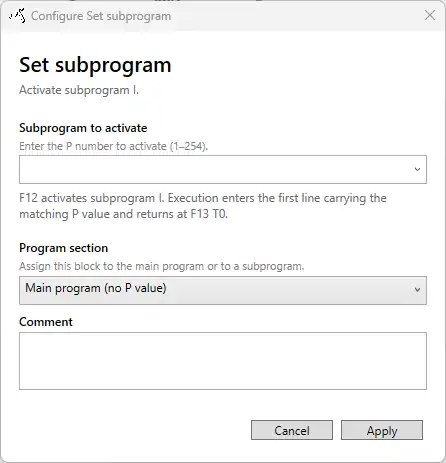
A user-defined program consists of a main program and, optionally, one or more sub-programs. The main program uses program-section value 0, which is represented in the Visual Programmer as Main program (no P value). Sub-programs are identified by a number from 1 to 254.
To assign an action to a sub-program, select the required number under Program section in the action’s configuration window. While a sub-program is active, only instructions carrying the corresponding program-section number are executed.
A sub-program can be activated in two ways:
- Set subprogram: Activates the selected sub-program unconditionally.
- Compare: Activates the selected sub-program only when the configured comparison is true.
When a sub-program is activated, the current line number is saved as the caller position. This allows execution to return to the point from which the sub-program was activated.
Activating a sub-program does not create a separate visual program or an automatic graphical branch. The SmartSampler2 continues through the generated code flow and executes only the instructions assigned to the active sub-program. A Jump to line action can additionally be used when execution should move directly to a particular part of the program.
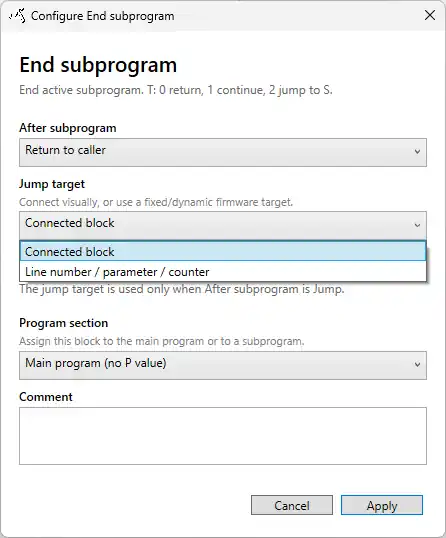
Use End subprogram to deactivate the current sub-program and determine where execution continues. Three options are available:
- Return to caller: Returns to the saved caller position and resumes execution after the action that activated the sub-program.
- Continue: Deactivates the sub-program and continues through the subsequent normal code flow.
- Jump: Deactivates the sub-program and continues at a specified jump target. The target can be a visually connected block or a line number, parameter, or counter.
There is no single required method for arranging sub-programs. Depending on the intended behaviour, a program can activate a sub-program and return to the caller, continue into the following main-program instructions, or jump to another location.
The End program action is not assigned to a sub-program. Whenever End program is executed, it terminates the complete user-defined program rather than only the active sub-program.