
The Program comments field provides a general description of the complete user-defined program. Program comments are displayed above the Start block and do not affect program execution.
Enter the description directly in the text field. Multiple lines can be used. When the flowchart is exported to code, every line is converted into a code comment beginning with // and placed before the first executable instruction. The First function: file line indicator shows the line on which program execution begins after the comments.
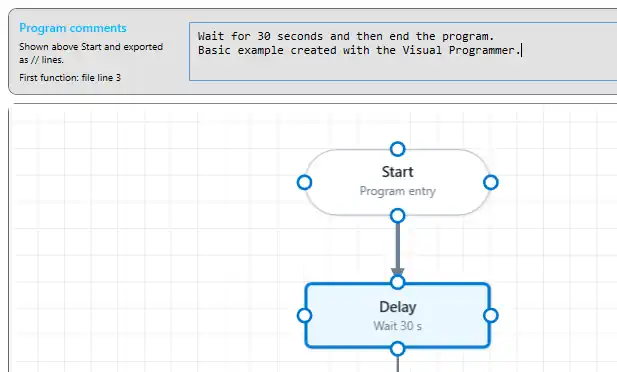
Program comments should briefly describe:
- the purpose of the program;
- the intended measurement sequence or interval;
- the connected module or sensors, where relevant;
- any important requirements or operating conditions.
Individual actions can also be documented using the Comment field in their configuration window. Use these action comments to explain settings or decisions that may not be immediately clear from the block itself.
Comments should explain the purpose of the program without repeating every action already visible in the flowchart.