
The Settings section defines how and when telemetry communication is performed.
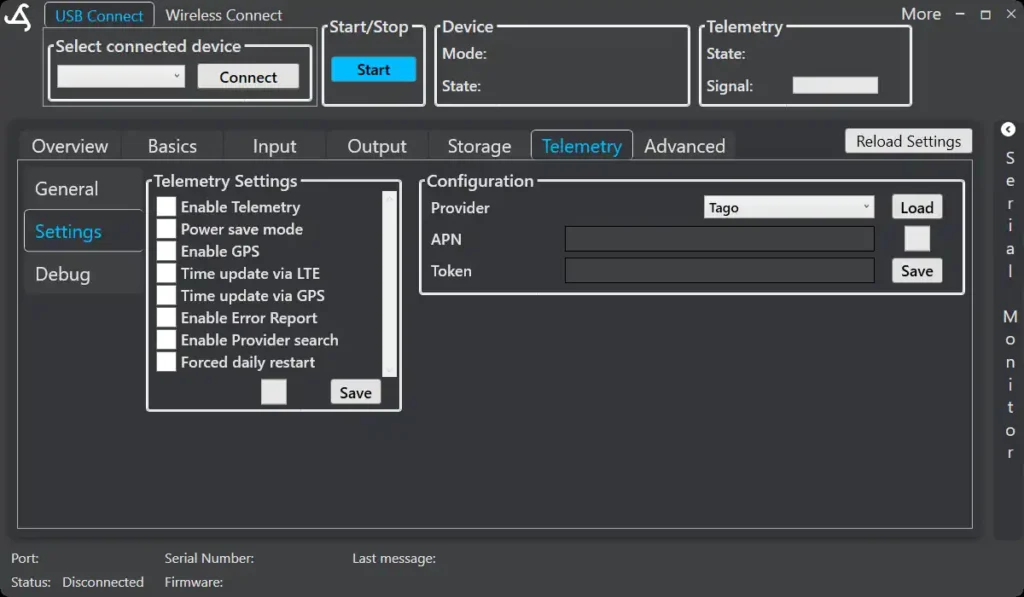
Telemetry Settings
Available options include:
- Enable Telemetry – Activates cellular communication
- Power save mode – Reduces energy consumption by powering down the module in between cycles
- Enable GPS – Allows location data transmission
- Time update via LTE – Synchronizes system time using the network
- Time update via GPS – Synchronizes system time using GPS
- Enable Error Report – Automatically sends error information
- Enable Provider search – Allows automatic network provider switching
- Forced daily restart – Improves long-term reliability
- Reduced Payload – Combines data into a single String
Changes must be saved to take effect.
Note: Some options are only selectable in the “Advanced Mode“
Configuration
Defines how data is sent to the remote platform.
- Provider – Select the telemetry service platform
- APN – Network access point name (if required)
- Token/ID – Authentication key for the selected provider
- Username – Username for the selected provider
- Passwort – Passwort for the selected provider
- Server – Only needed for custom selection
Use Load to apply provider-specific defaults and Save to store changes.