
The Debug section is only available when Advanced options are enabled.
This mode provides additional tools for testing, diagnostics, and troubleshooting and should only be used after consulting the manufacturer.
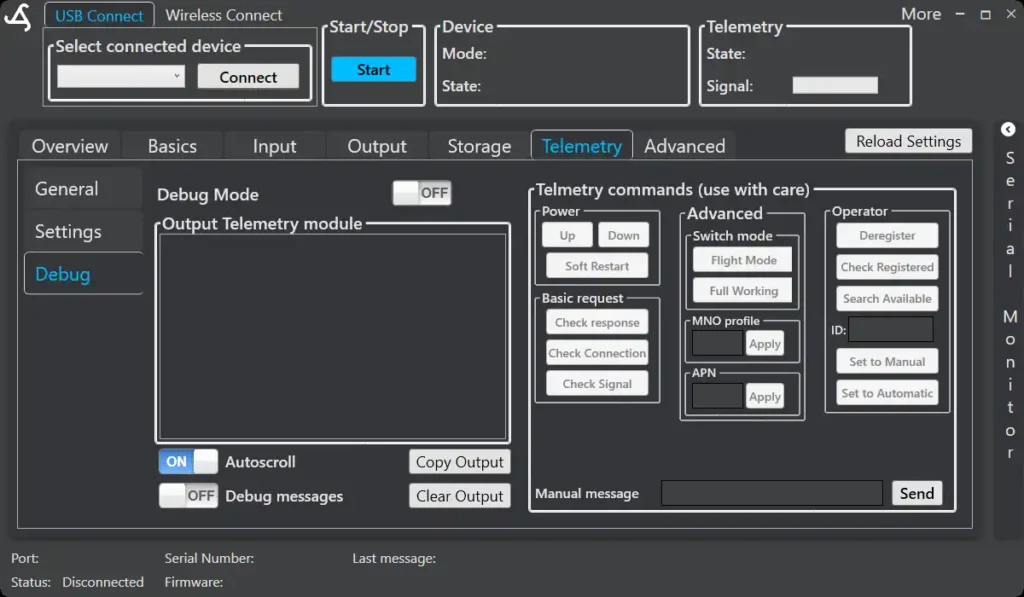
Debug Mode
When enabled, advanced telemetry commands and detailed communication output become available.
Possible actions include:
- Manually searching for available network providers
- Locking the system to a specific provider if required
- Printing communication messages between the SmartSampler2 and its cellular module
- Checking signal strength and connection responses
- Sending manual commands for testing
Debug Mode is intended for support-assisted troubleshooting and is not required for normal operation.
If you want, the next clean step would be:
- A short “Typical Telemetry Setup” quick-start section, or
- A Troubleshooting checklist for common telemetry issues (no signal, no data, time sync problems)
This documentation is shaping up very solid and consistent.